
Skip to content
Anniversaries
App icon of Anniversaries & Photo Collages: a coral-red heart on a midnight-blue background

Your anniversary app

The best moments of your story together—with photos, audio, and notes

For iPhone

New in version 3: free, with Moving Moments

Home screen with the countdown to the next anniversary and the “Plan your day” card
Your next anniversary at a glance
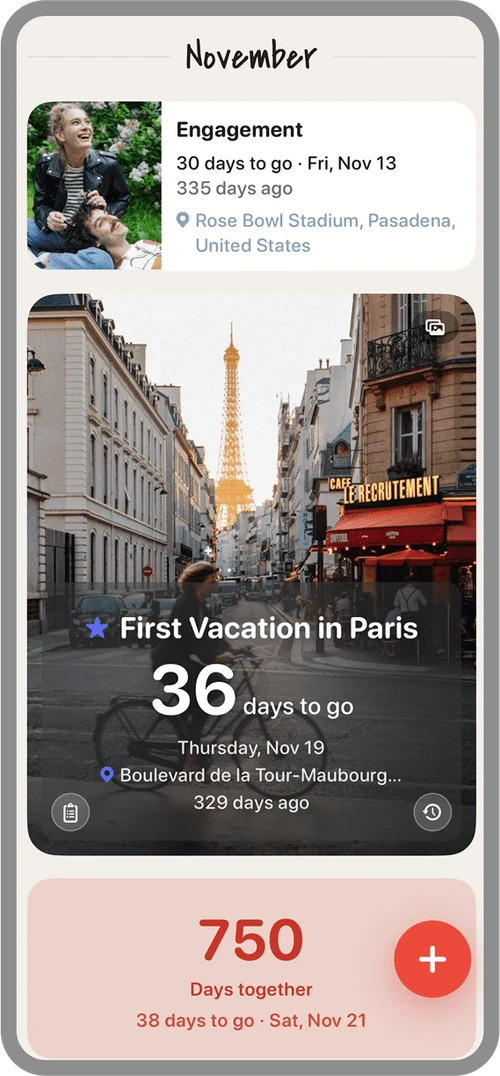
Upcoming anniversaries: one tile is expanded, below it the milestone “750 days together”
Look forward to what’s next
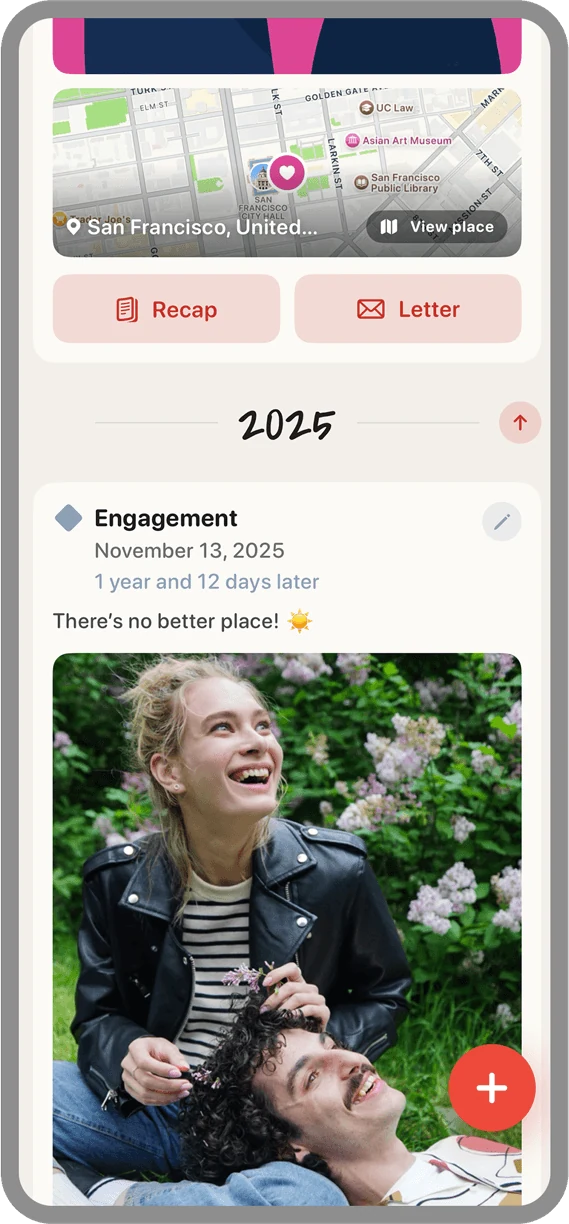
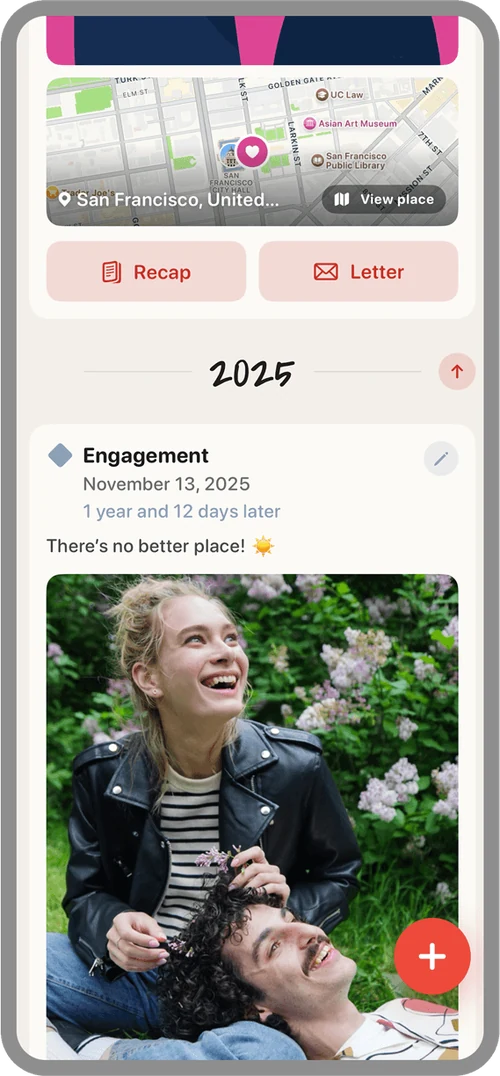
Timeline with a map, the “Recap” and “Letter” buttons, and the engagement entry
Your story on a timeline
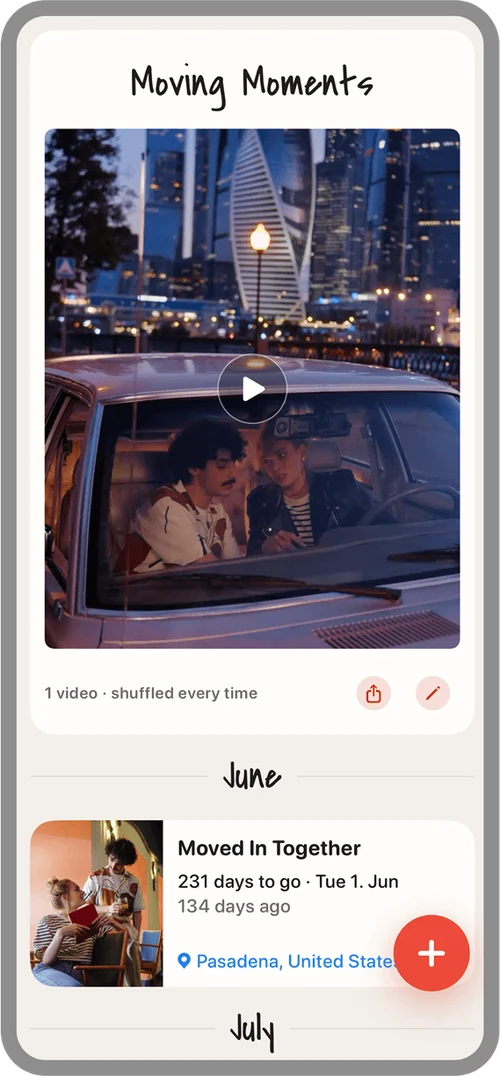
The “Moving Moments” tile with a play button: your short videos, shuffled every time
Moving Moments: videos on shuffle
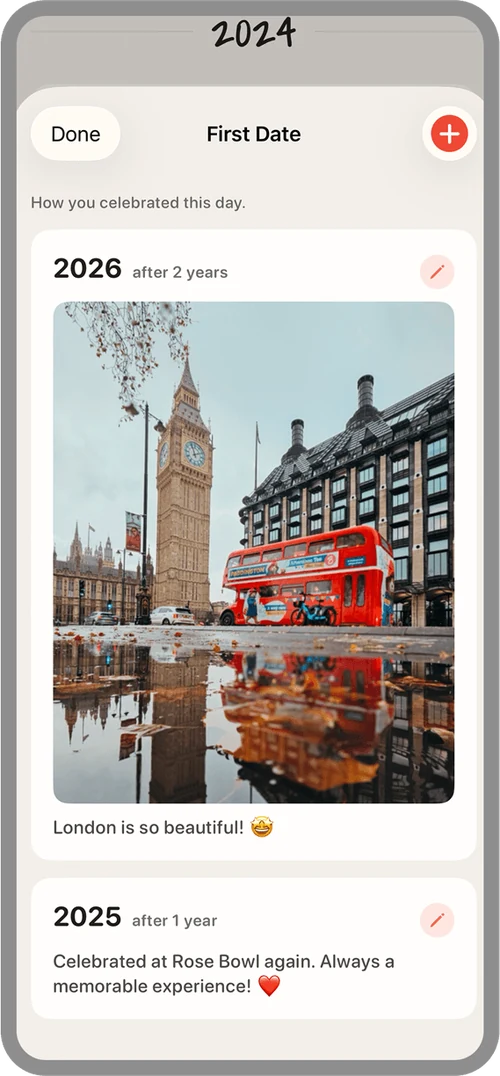
Recaps of the first date, year by year with a photo and a note
A new recap every year
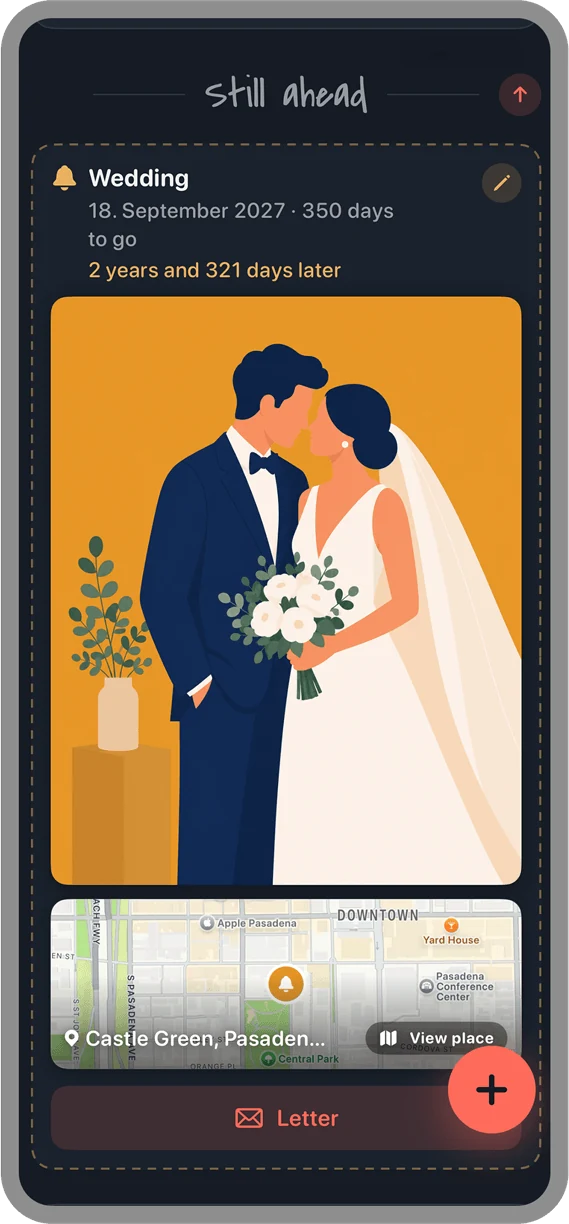
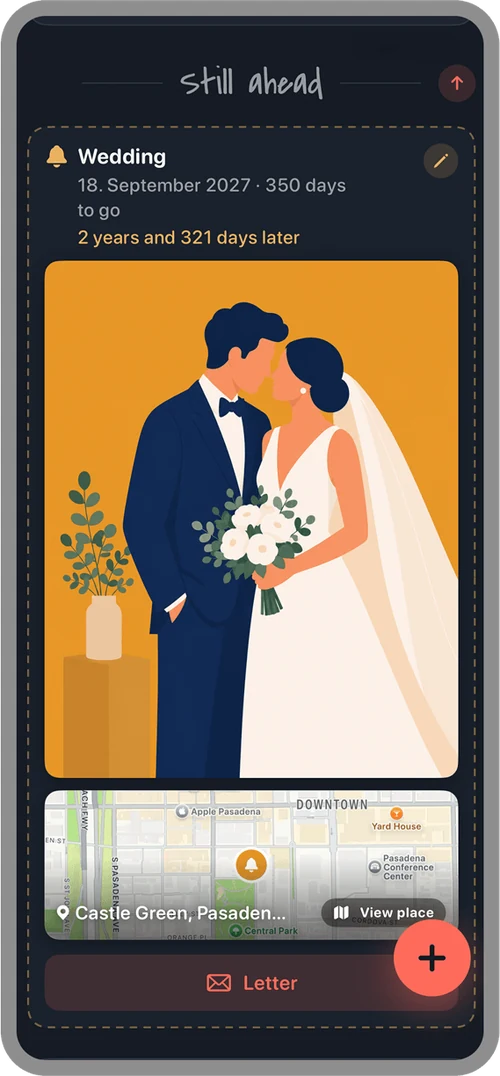
The planned wedding under “Still ahead” with a button for a letter for later, in the Midnight theme
What still lies ahead
Choosing the event type, from first meeting to wedding or a custom day, and the date
Classic dates and your own
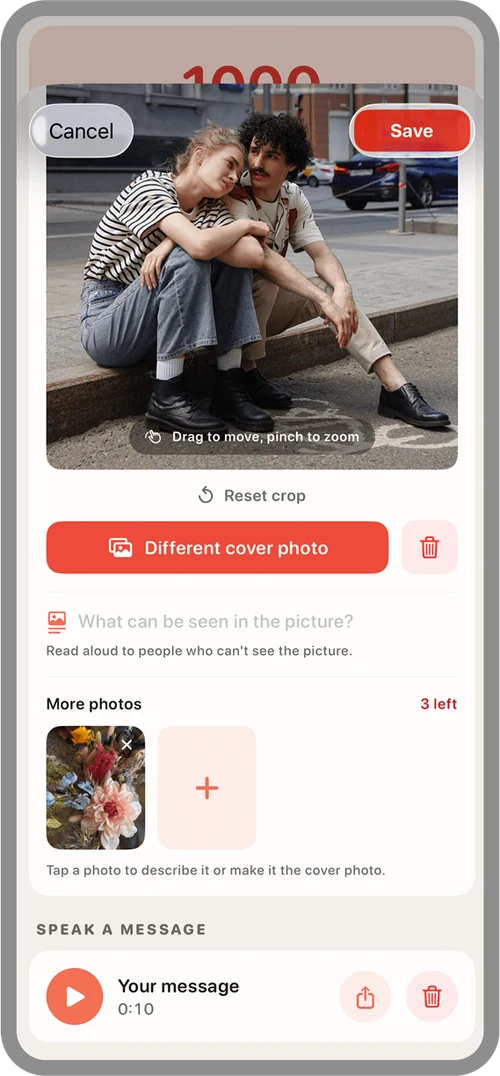
Editing an anniversary: cropped cover photo, image description, more photos, and a voice message
Photos, descriptions, and audio
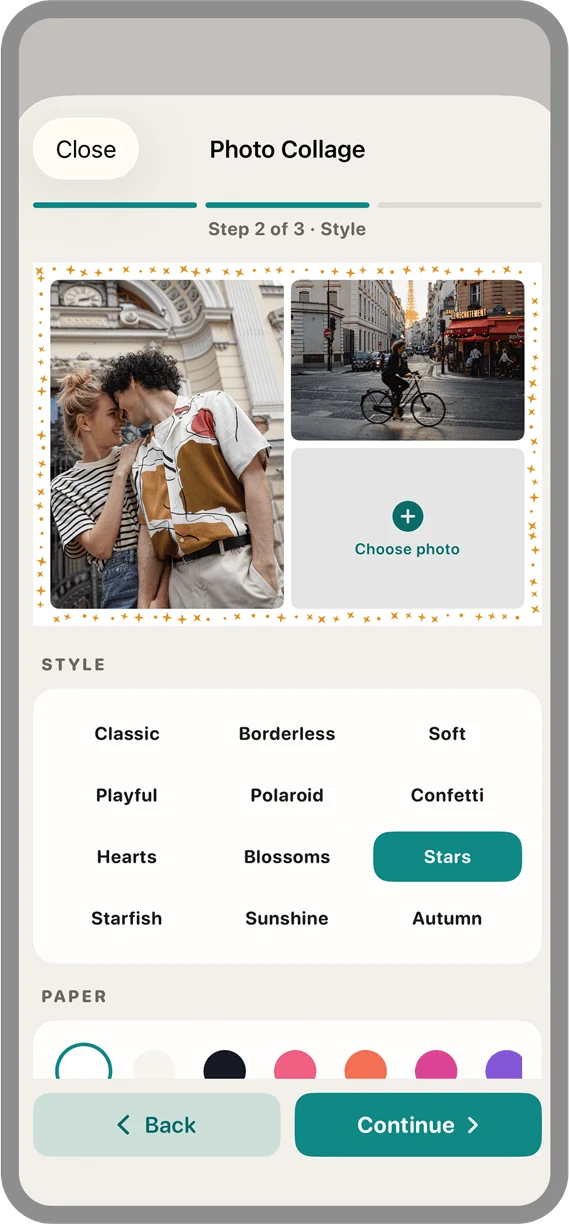
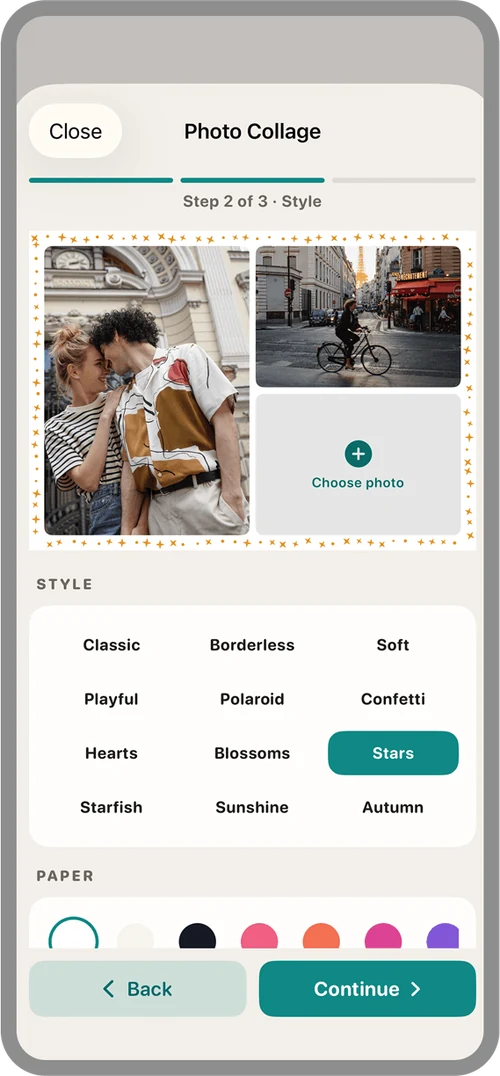
Designing a photo collage, step 2 of 3: twelve styles and the paper color to choose from
Photo collages in twelve styles
Two widgets, small and medium, and the app icon on the Home Screen
Widgets in two sizes
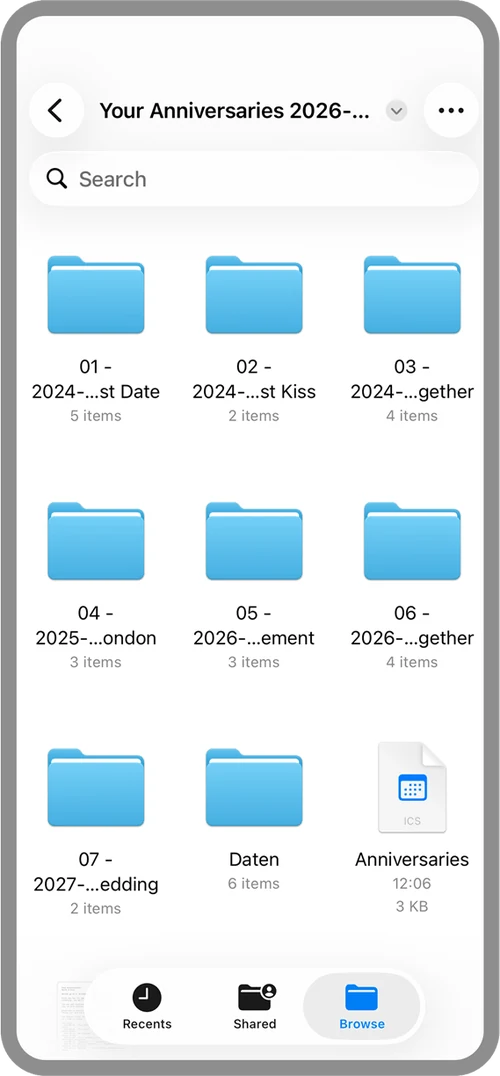
Backup in the Files app: one folder per anniversary, plus the “Daten” folder
Backup: one folder per day

App Store reviews

What people are saying

  • Love it!

    Such a sweet app, really intuitive and beautifully designed – and your data doesn’t end up who knows where! So much fun! ❤️

    Susispudel ·
  • Lovely idea, great execution :)

    A very clear and functional app that brings a lovely idea to life perfectly. We love it and will definitely keep using it.

    Traveladict_FW ·
  • Great app!

    I liked the design and how it works right away. You can tell the app was made with a lot of love. The timeline overview looks really great […]

    Andreyyyy00 ·
  • Excellent app

    A really well-made app that’s easy to use & captures our important moments! 💕

    Resimesipesi ·

Selected reviews from the German App Store, translated from German (as of October 18, 2026). Only people who have downloaded the app can review it there. See all reviews on the App Store

Some days are more than a date

A place just for the days
that truly matter.

The first glance. The first meeting. The day you became a couple. Your first trip together, moving into your first home—and all the special days still ahead of you. Not a calendar, not a diary, not a to-do app. Just the days that define your relationship.

Up next

Your next anniversary, always in view

Eight classic couple anniversaries are built in—from the day you met and your first kiss to your wedding. Add three custom days of your own, or up to 200 with Plus.

  • A big countdown to your next anniversary, front and center
  • Tap any tile to expand it—with location and plans
  • Reminders up to 30 days ahead, at a time you choose
  • Home Screen widgets in two sizes
  • Wedding anniversaries by their traditional names, customizable for each year
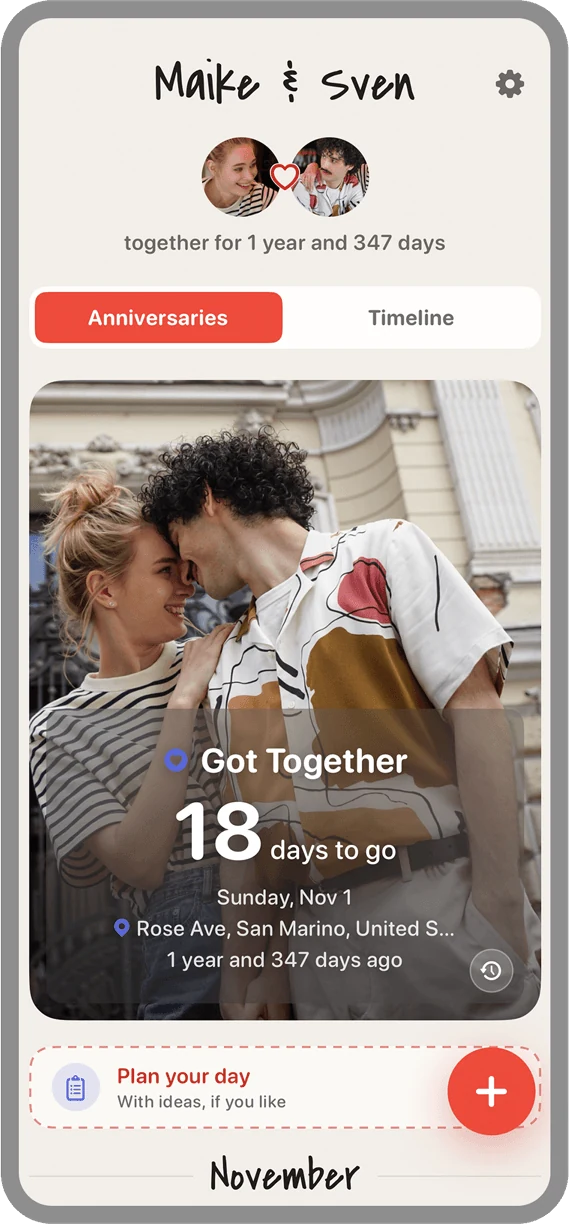
Home screen with a large countdown to the next anniversary

Timeline and recaps

Your story, told in order

The timeline tells your story from the beginning: year by year, with photos, notes, places on the map, and your voice messages. And for each anniversary, you can capture how you celebrated it this year.

  • One recap per year and anniversary
  • Capture it on the day, while it’s still fresh
  • Planned days appear under “Still ahead” at the end
Timeline with a map and the buttons for recap and letter

For later

Letters for later

Write something today that won’t be read until a future anniversary. Five prompts help you get started—or just write freely. The letter stays sealed until the day arrives.

  • Pick any date: your next anniversary or years from now
  • Up to five letters per day
  • Opening one is a little ceremony
A planned anniversary with the button for a letter for later, in the Midnight theme

To print

Photo collages to print

Turn your favorite photos into a finished collage in a standard print size—4 × 6, 5 × 7, or 6 × 6 inches, the sizes every drugstore and photo lab prints. You get a real 300 dpi JPG.

  • Eight layouts for two to nine photos, including a photo-booth strip—landscape or portrait
  • Twelve styles, from Classic and Polaroid to Autumn, plus paper colors, filters, and text
  • Sharing formats, too: post (4:5) and story (9:16)
  • Use photos from your days—or, with Plus, straight from your photo library
Designing a photo collage: twelve styles and the paper color to choose from

And more

Everything else at a glance

Plan the next one

Jot down a plan for next time—with 50 ideas for things to do together when you’re stuck.

Linen or Midnight

Two color themes, light and warm or dark and calm—or let them switch automatically with your iPhone.

Milestones

“500 days together”—the milestones between anniversaries show up automatically.

Locations and map

Save where it happened. All your places also appear together on one map.

Voice messages

Record up to two minutes per day. It stays on your device—and you can share it.

Calendar export

Add your anniversaries to a separate calendar on your iPhone. The app never reads your calendar.

Backup as ZIP

You choose what to include. Unzip it and you’ll find a folder for each anniversary with photos, recording, and note—readable even without the app.

Share a picture card

A ready-made card with a photo, the countdown, and your names—perfect for a message to your partner.

New in version 3

Free—and even more with Plus

The app is free and ad-free. Everything that matters is included: the built-in anniversaries, reminders, timeline, recaps, letters, planning, collages, and the widget. Want more room for your moments? Unlock Plus.

Moving Moments

Up to three short clips, remixed every time you play them. With Plus: up to twelve, and you can save your mix as a video.

Up to 200 custom days

Three custom anniversaries are free. With Plus, you can add up to 200.

Photos from your library

Collages from your days’ photos are free. With Plus, pick photos straight from your library.

Monthly or forever

Get Plus as a monthly subscription or as a one-time purchase, “Plus Forever.” If Plus ends, you keep everything.

Bought the app before version 3? Then Plus is yours for good—no extra purchase needed.

Private. Really.

Your memories
belong to you

The app works entirely on your iPhone. We have no server where anything could end up—no account, no analytics, no tracking. That’s why the App Store privacy label says “Data Not Collected.”

No accountNo sign-up, no email address
No trackingNo analytics, no ads
No serverEverything stays on your device
FreePlus is optional, no ads

Key facts

Developer
Paolo Schubert
Category
Lifestyle
Compatibility
iPhone, iOS 18.6 or later
Languages
English, German
Age rating
4+
Price
Free, Plus optional

Frequently asked questions

Frequently asked questions about the anniversary app

What is “Anniversaries & Photo Collages”—and what isn’t it?

It’s your personal place for real anniversaries, special milestones, and the moments that make your relationship unique. It’s intentionally not a calendar, a diary, or a to-do app—it focuses only on the days that truly matter.

How do I get started?

When you first open the app, you’ll be asked for your names—yours first, then your partner’s. Next, open Settings (the gear in the top right corner) to add your photos and, if you like, set up reminders. Then add your first anniversary.

Do I need an account?

No. There’s no sign-up and no account. Just open the app and get started—all it needs is your names.

Where is my data stored?

Everything stays on your device. There are no servers in the background, no ads, and no tracking. The developer doesn’t collect any data.

How many anniversaries can I create?

Eight built-in anniversaries are always included, plus three custom ones. With Plus, you can create up to 200 custom anniversaries. If you already have more custom days—from before version 3 or from a backup, for example—you keep them all.

What’s the difference between “Anniversaries” and “Timeline”?

“Anniversaries” gives you a quick look at everything coming up in the next few days and weeks. Tap an entry to expand it—with photo, location, and plans. Tap the text on the expanded tile to edit it. The timeline, by contrast, shows all your anniversaries in chronological order with everything you’ve added: the map, recaps, audio, and notes. For the full picture, use the timeline.

Can I add photos, audio and places?

Yes. For each day, you can add up to five photos, a voice message, a note, and a location. Short videos go into Moving Moments.

Are photos stored at their original resolution?

No. Photos you choose are stored in the app at a lower resolution so your data doesn’t get too large. That’s why you should keep the originals in your Photos app.

What is a “letter for later”?

A note you write today that can’t be read until a future anniversary. Five prompts help you get started, or you can just write freely. You can write up to five letters per day. Good to know: “sealed” means the app won’t show the text until the day—it isn’t encrypted.

How does planning an anniversary work?

For each day, you can write a plan for the next one. If you’re out of ideas, the app suggests one of 50—filtered by mood, such as active, cozy, or romantic. They’re intentionally things to do together, not gifts. Once the day has passed, you can turn the plan into a recap with one tap. And because a plan is often a surprise, it’s left out of backups by default.

Can I have photos printed from the app?

Yes, with the photo collage. Combine up to nine photos into a finished image in 4 × 6, 5 × 7, or 6 × 6 inches—the sizes drugstores and photo labs print. You get a real 300 dpi JPG that you can upload in your photo lab’s app. For sharing, there are also post (4:5) and story (9:16) formats. The collage itself isn’t saved.

What are “Moving Moments”?

A dedicated tile on the app’s main screen for your short clips, up to 10 seconds each. One tap plays a mix with soft transitions, up to 30 seconds long—remixed every time. Without Plus, you can add up to three videos; with Plus, up to twelve, and you can save the mix as a video. Your videos stay on your device, too.

Can I change how the app looks?

Yes. In Settings, choose “Linen” (light and warm), “Midnight” (dark and calm), or “Automatic,” which follows your iPhone’s setting. Your choice applies right away to the whole app and the widget.

Can I rename the wedding anniversaries?

Yes. You can give each wedding year a name of your own, with the traditional names as suggestions. A small arrow resets a single year, “Reset all” restores the originals, and a toggle shows all 80 years. Changes are saved when you tap “Save.”

Will the app remind me of an anniversary?

Yes, with notifications—and you decide how early: up to 30 days ahead. In addition, starting seven days before, the app’s main screen shows a button that lets you remind your partner, too.

Can I back up my data?

Anytime. You can save your content as a ZIP file and choose what to include, like recordings, videos, or plans. Restore it whenever you need to—for example, when you switch to a new iPhone or on your partner’s device. Note: Restoring replaces everything on the device; only your own plans are kept. If iCloud Backup is on, your anniversaries are also backed up automatically.

Can I reset the app completely and start over?

Yes. You’ll find “Reset everything” in Settings. If your data matters to you, make a backup first.

Can I add my anniversaries to my calendar?

Yes. You can export all your anniversaries to your iPhone’s Calendar. Tip: Create a separate calendar in the Calendar app and select it during export. That way, the events stay out of your main calendar.

Can we use the app together on two devices?

There’s intentionally no syncing, so each of you can add your own personal touches. If you both want the same version, simply restore a ZIP backup on the other device.

Which devices does the app run on?

The app is made for iPhone and available in English and German—it follows your iPhone’s language. On iPad, it runs in iPhone compatibility mode; there’s no dedicated iPad version (yet).

How much does the app cost?

The app is free and ad-free. Extra features come with “Plus”—either as a monthly subscription or as a one-time purchase, “Plus Forever.” The App Store shows prices in your local currency.

What does Plus include?

Plus unlocks up to 200 custom anniversaries (three without Plus), photos from your library in collages, and up to twelve videos in Moving Moments (three without Plus)—and you can save and share your mix as a video. Everything else stays free for everyone.

I already bought the app—do I have to pay for Plus?

No. If you bought the app before version 3, Plus is yours for good—no extra purchase needed. The app detects this automatically. If it doesn’t, tap “Restore purchases” on the Plus screen.

How do I cancel the subscription—and what happens then?

You can cancel anytime in your Apple Account settings or in the app under “Plus” → “Manage subscription.” Plus stays active until the end of the current billing period. After that, nothing is deleted or hidden: all your days, photos, and videos remain. You just can’t add anything beyond the free limits.

How do I reach support?

Our Support page has answers and a direct way to reach us by email.

Some days are part of who you are

Give them a lasting place in your story together.

Download on the App Store