Skip to content
Anniversaries

Release notes

What’s changed in Anniversaries & Photo Collages, from the first version to today. The latest update is at the top.

Version 3.0 Latest

Anniversaries is now free

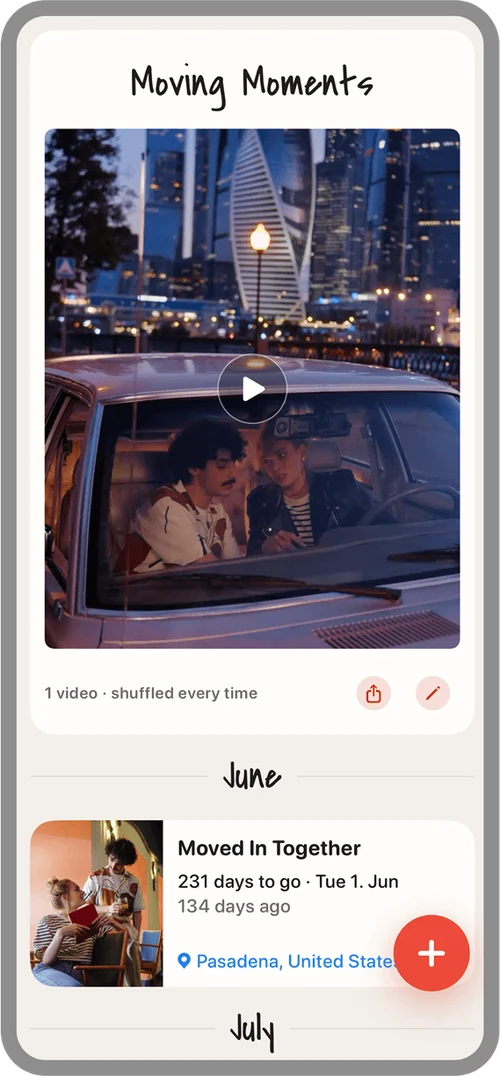
The app no longer costs anything and stays ad-free. If you want more, add Plus as a monthly subscription or as a one-time “Plus Forever” purchase. Also new: Moving Moments, your short videos in a mix that’s reshuffled every time you open it.

  • New: Moving Moments – your short videos, shuffled every time you open them, with smooth transitions
  • New: Anniversaries Plus – up to 200 custom days, photos from your library in collages, up to twelve videos, and saving your mix as a video
  • Backup with options: choose what goes into your backup, such as recordings, videos, or plans
  • A calmer, clearer design and a redesigned large tile at the top
  • Better contrast and cleaner layouts with larger text
  • Lots of small improvements and bug fixes

Already bought the app? Then Plus is unlocked for you forever. Thank you!

The “Moving Moments” tile with a play button: your short videos, shuffled every time

Version 2.2

A tidier home screen

The tiles on the home screen are slimmer, and photo collages have a permanent spot.

  • Improved tile logic and design: the small tiles are simpler, and one tap expands them
  • A new spot for photo collages: their own tile on the home screen and in the timeline

Version 2.1

Photo collages in three steps

Photo collages got a big upgrade, with more styles, text, and formats for sharing.

  • Photo collages in three steps, with new styles and text at the top or bottom
  • Choose filters, spacing, and fonts – the app remembers your settings
  • Formats for sharing: post (4:5) and story (9:16)
  • A warning when a photo would be too blurry to print
  • Minor bug fixes

Version 2.0

Now in English

The app now speaks two languages and follows the language of your iPhone. This update also brought more custom days and support for larger text.

  • More custom anniversaries: 50 instead of 25
  • The app is now available in English
  • New photo collage templates
  • Accessibility: the app now scales with Larger Text
  • Rename the wedding anniversaries yourself
  • Design tweaks and minor bug fixes

Then – and now: Today: three custom days for free, up to 200 with Plus. If you’ve already created more, you keep them all.

Version 1.3

More for photo collages

More options for photo collages and a few small helpers for browsing.

  • New photo collage features
  • Month headings in the list of anniversaries
  • A heart between your two photos
  • Jump through the years of your timeline

Version 1.2

Plan, print, and pick a theme

With this update, the app became more than a place for memories: plan your next day together and put your photos on paper.

  • Create photo collages (4 × 6 in) and export them for printing
  • Plan anniversaries – with an idea generator
  • Two themes: Linen (light) or Midnight (dark)

Version 1.1

Widget and letters for later

Your next anniversary moves to your Home Screen, and you can write letters for the future.

  • Home Screen widget in two sizes – your next anniversary with a photo and countdown
  • Letters to yourselves that you can write for future moments
  • Picture cards to share
  • Minor improvements

Version 1.0

The beginning

The first version, with everything at the heart of the app.

  • Eight built-in couple anniversaries plus your own days
  • A countdown to your next anniversary and reminders via notifications
  • A timeline of your story together
  • Photos, a voice message, a note, and a place for every day
  • Calendar export and backup as a ZIP file
  • No account and no tracking – all your data stays on your device

You get every update automatically through the App Store. Questions? See the FAQ and the support page.

← Back to home